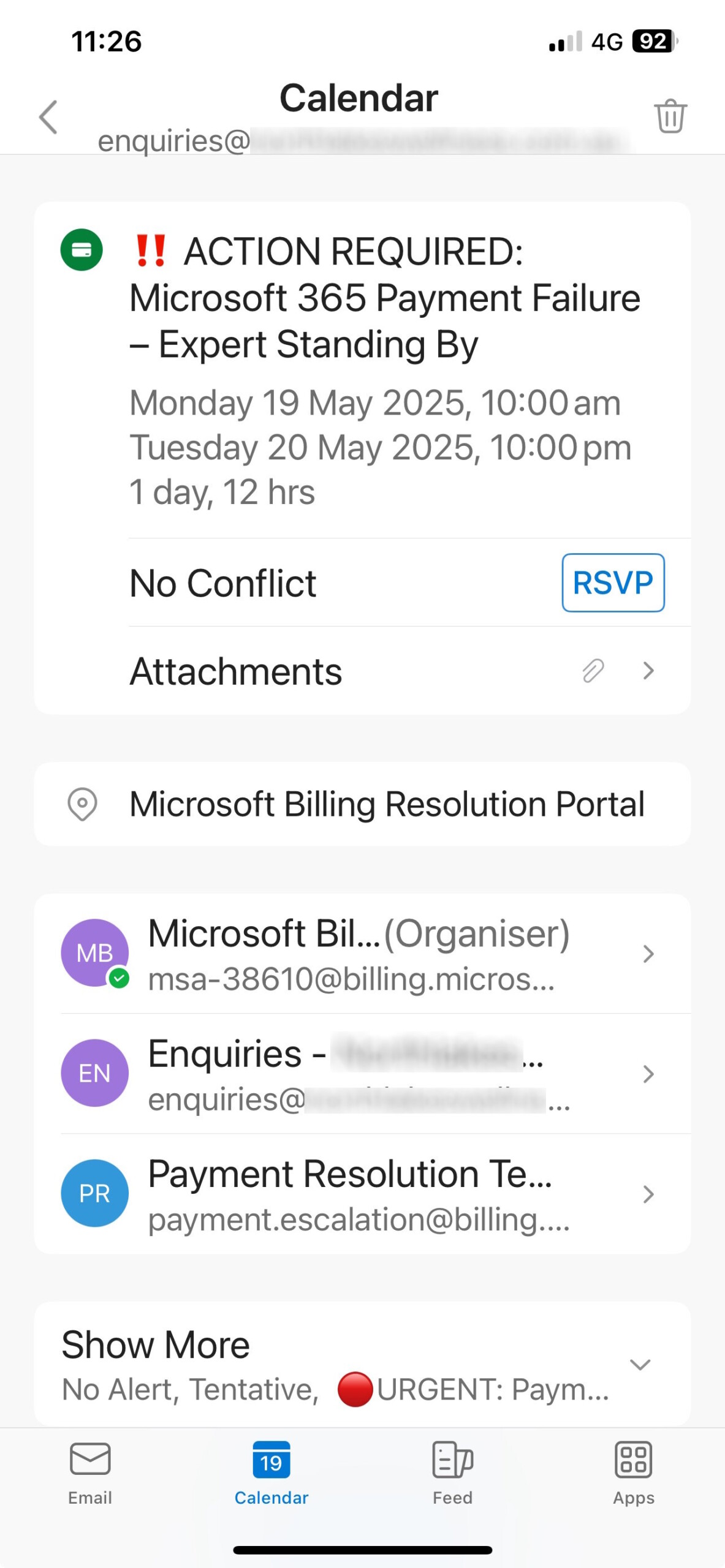
We’ve recently been made aware of fraudulent emails circulating that claim to be urgent reminders to renew your office subscriptions, specifically mentioning “Microsoft 365 Payment Failure – Expert Standing By.” These emails are not from us or Microsoft, and they are designed to deceive you.
How to Identify These Fake Emails
These scam emails often include the following elements:
- Urgent Calendar Reminders: They may contain calendar events (e.g., a reminder for “Monday 19 May 2025, 10:00 am” or “Tuesday 20 May 2025, 10:00 pm”) with an “RSVP” option.
- .htm Attachments: These emails may include .htm file attachments, which could contain malicious links or code.
- Suspicious Sender Addresses: The emails may appear to come from legitimate sources like “enquiries@northlakeswellness.com.au” or other domains, but they are not affiliated with us or Microsoft.
- Urgency Tactics: They often mark the message as “URGENT: PAYMENT” to pressure you into taking immediate action.
What You Should Do
- Do Not Click Links or Open Attachments: Avoid interacting with any links, RSVPs, or .htm attachments in these emails, as they may lead to phishing sites or install malware.
- Delete the Email immediately.
- Verify with Us Directly: If you’re unsure about your subscription status, contact us directly through our official website or customer support channels. Do not use contact details provided in the suspicious email.
Stay Safe
Your security is our priority. We will never send urgent payment reminders with .htm attachments or calendar invites in this manner. Always double-check the sender’s email address and reach out to us if something seems off.
Here are a couple of screenshots of what our customers have received: